How to inspect model fit results
[1]:
import rlssm

# load non-hierarchical DDM fit:
model_fit_ddm = rlssm.load_model_results('/Users/laurafontanesi/git/rlssm/docs/notebooks/DDM.pkl')

# load non-hierarchical LBA fit:
model_fit_lba = rlssm.load_model_results('/Users/laurafontanesi/git/rlssm/docs/notebooks/LBA_2A.pkl')

# load hierarchical RL fit:
model_fit_rl = rlssm.load_model_results('/Users/laurafontanesi/git/rlssm/docs/notebooks/hierRL_2A.pkl')
Posteriors
The posterior samples are stored in samples:
[2]:
model_fit_ddm.samples
[2]:
| chain | draw | transf_drift | transf_threshold | transf_ndt | |
|---|---|---|---|---|---|
| 0 | 0 | 339 | 0.603124 | 1.290092 | 0.239343 |
| 1 | 0 | 784 | 0.795615 | 1.308542 | 0.240124 |
| 2 | 0 | 250 | 0.766659 | 1.299046 | 0.238052 |
| 3 | 0 | 498 | 0.909609 | 1.293544 | 0.242449 |
| 4 | 0 | 854 | 0.894703 | 1.304357 | 0.235697 |
| ... | ... | ... | ... | ... | ... |
| 1995 | 1 | 482 | 0.893670 | 1.245259 | 0.245646 |
| 1996 | 1 | 882 | 0.862621 | 1.228198 | 0.248502 |
| 1997 | 1 | 571 | 0.732467 | 1.281621 | 0.235845 |
| 1998 | 1 | 403 | 0.767313 | 1.278530 | 0.243468 |
| 1999 | 1 | 998 | 0.812562 | 1.285636 | 0.242826 |
2000 rows × 5 columns
[3]:
model_fit_rl.samples.describe()
[3]:
| chain | draw | transf_mu_alpha | transf_mu_sensitivity | alpha_sbj[1] | alpha_sbj[2] | alpha_sbj[3] | alpha_sbj[4] | alpha_sbj[5] | alpha_sbj[6] | ... | sensitivity_sbj[18] | sensitivity_sbj[19] | sensitivity_sbj[20] | sensitivity_sbj[21] | sensitivity_sbj[22] | sensitivity_sbj[23] | sensitivity_sbj[24] | sensitivity_sbj[25] | sensitivity_sbj[26] | sensitivity_sbj[27] | |
|---|---|---|---|---|---|---|---|---|---|---|---|---|---|---|---|---|---|---|---|---|---|
| count | 2000.000000 | 2000.000000 | 2000.000000 | 2000.000000 | 2000.000000 | 2000.000000 | 2000.000000 | 2000.000000 | 2000.000000 | 2000.000000 | ... | 2000.000000 | 2000.000000 | 2000.000000 | 2000.000000 | 2000.000000 | 2000.000000 | 2000.000000 | 2000.000000 | 2000.000000 | 2000.000000 |
| mean | 0.500000 | 499.500000 | 0.215143 | 0.459187 | 0.118446 | 0.038598 | 0.153991 | 0.125686 | 0.228167 | 0.176434 | ... | 0.186011 | 0.222761 | 0.345018 | 0.675645 | 0.594302 | 0.733052 | 0.380368 | 0.400283 | 0.207491 | 0.255721 |
| std | 0.500125 | 288.747186 | 0.026105 | 0.031864 | 0.049484 | 0.046423 | 0.070357 | 0.053255 | 0.081044 | 0.086367 | ... | 0.142018 | 0.035984 | 0.051357 | 0.129893 | 0.112983 | 0.162488 | 0.062239 | 0.142786 | 0.119114 | 0.064612 |
| min | 0.000000 | 0.000000 | 0.137208 | 0.371670 | 0.013977 | 0.004837 | 0.016532 | 0.021659 | 0.030638 | 0.016090 | ... | 0.033029 | 0.134701 | 0.226670 | 0.383286 | 0.293426 | 0.361626 | 0.216227 | 0.165044 | 0.050049 | 0.129987 |
| 25% | 0.000000 | 249.750000 | 0.197125 | 0.437836 | 0.081938 | 0.017878 | 0.103897 | 0.087518 | 0.172536 | 0.111644 | ... | 0.074628 | 0.197551 | 0.308241 | 0.585866 | 0.514762 | 0.616664 | 0.336826 | 0.297846 | 0.116860 | 0.211426 |
| 50% | 0.500000 | 499.500000 | 0.214402 | 0.457982 | 0.111285 | 0.027213 | 0.142031 | 0.118346 | 0.222287 | 0.162954 | ... | 0.127833 | 0.218959 | 0.340830 | 0.661773 | 0.582411 | 0.714372 | 0.373471 | 0.366054 | 0.177753 | 0.242781 |
| 75% | 1.000000 | 749.250000 | 0.231833 | 0.478926 | 0.146284 | 0.043262 | 0.191607 | 0.154902 | 0.278837 | 0.228109 | ... | 0.266526 | 0.242577 | 0.375535 | 0.752205 | 0.657723 | 0.831164 | 0.416691 | 0.473252 | 0.266407 | 0.286889 |
| max | 1.000000 | 999.000000 | 0.322323 | 0.602965 | 0.386474 | 0.812427 | 0.538177 | 0.378176 | 0.540157 | 0.527946 | ... | 0.879778 | 0.582695 | 0.697668 | 1.244169 | 1.158730 | 1.626704 | 0.705096 | 1.150375 | 0.990639 | 0.711207 |
8 rows × 58 columns
You can simply plot the model’s posteriors using plot_posteriors:
[4]:
model_fit_ddm.plot_posteriors();
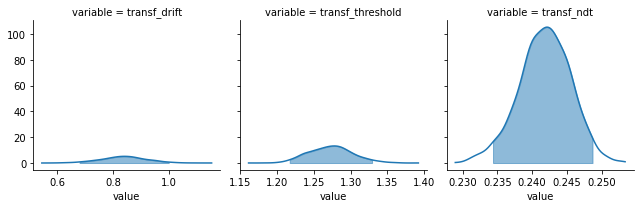
By default, 95% HDIs are shown, but you can also choose to have the posteriors without intervals or BCIs, and change the alpha level:
[5]:
model_fit_rl.plot_posteriors(show_intervals='BCI', alpha_intervals=.01);

Trial-level
Depending on the model specification, you can also extract certain trial-level parameters as numpy ordered dictionaries of n_samples X n_trials shape:
[6]:
model_fit_ddm.trial_samples['drift_t'].shape
[6]:
(2000, 400)
[7]:
model_fit_ddm.trial_samples.keys()
[7]:
odict_keys(['drift_t', 'threshold_t', 'ndt_t'])
[8]:
model_fit_lba.trial_samples.keys() # for the LBA
[8]:
odict_keys(['k_t', 'A_t', 'tau_t', 'drift_cor_t', 'drift_inc_t'])
In the case of a RL model fit on choices alone, you can extract the log probability of accuracy=1 for each trial:
[9]:
model_fit_rl.trial_samples.keys()
[9]:
odict_keys(['log_p_t'])
[10]:
model_fit_rl.trial_samples['log_p_t'].shape
[10]:
(2000, 6464)
Posterior predictives
With get_posterior_predictives_df you get posterior predictives as pandas DataFrames of n_posterior_predictives X n_trials shape:
[11]:
pp = model_fit_rl.get_posterior_predictives_df(n_posterior_predictives=1000)
pp
[11]:
| variable | accuracy | ||||||||||||||||||||
|---|---|---|---|---|---|---|---|---|---|---|---|---|---|---|---|---|---|---|---|---|---|
| trial | 1 | 2 | 3 | 4 | 5 | 6 | 7 | 8 | 9 | 10 | ... | 6455 | 6456 | 6457 | 6458 | 6459 | 6460 | 6461 | 6462 | 6463 | 6464 |
| sample | |||||||||||||||||||||
| 1 | 1 | 1 | 1 | 1 | 1 | 1 | 0 | 0 | 1 | 0 | ... | 0 | 1 | 1 | 1 | 1 | 1 | 1 | 1 | 1 | 1 |
| 2 | 0 | 1 | 1 | 1 | 1 | 1 | 0 | 1 | 1 | 1 | ... | 0 | 0 | 1 | 1 | 1 | 1 | 1 | 1 | 1 | 1 |
| 3 | 1 | 1 | 0 | 0 | 0 | 1 | 1 | 0 | 1 | 1 | ... | 0 | 1 | 1 | 0 | 0 | 0 | 1 | 1 | 1 | 1 |
| 4 | 0 | 1 | 0 | 1 | 0 | 1 | 1 | 1 | 1 | 1 | ... | 0 | 0 | 1 | 1 | 1 | 1 | 1 | 1 | 1 | 1 |
| 5 | 1 | 1 | 1 | 0 | 1 | 1 | 0 | 0 | 1 | 1 | ... | 0 | 1 | 1 | 1 | 1 | 1 | 1 | 1 | 1 | 0 |
| ... | ... | ... | ... | ... | ... | ... | ... | ... | ... | ... | ... | ... | ... | ... | ... | ... | ... | ... | ... | ... | ... |
| 996 | 1 | 1 | 0 | 0 | 0 | 1 | 0 | 0 | 1 | 1 | ... | 1 | 0 | 1 | 1 | 1 | 1 | 1 | 1 | 1 | 1 |
| 997 | 1 | 0 | 0 | 1 | 1 | 0 | 1 | 0 | 1 | 1 | ... | 0 | 0 | 1 | 0 | 0 | 0 | 1 | 0 | 0 | 1 |
| 998 | 0 | 0 | 0 | 1 | 1 | 1 | 1 | 0 | 1 | 1 | ... | 1 | 1 | 1 | 0 | 1 | 0 | 1 | 1 | 1 | 0 |
| 999 | 1 | 1 | 0 | 0 | 1 | 1 | 1 | 1 | 1 | 1 | ... | 0 | 0 | 0 | 1 | 1 | 1 | 1 | 0 | 1 | 1 |
| 1000 | 0 | 0 | 1 | 1 | 0 | 1 | 0 | 1 | 1 | 1 | ... | 0 | 0 | 1 | 1 | 1 | 1 | 1 | 1 | 1 | 1 |
1000 rows × 6464 columns
For the DDM, you have additional parameters to tweak the DDM simulations, and you get a DataFrame with a hierarchical column index, for RTs and for accuracy:
[12]:
pp = model_fit_ddm.get_posterior_predictives_df(n_posterior_predictives=100, dt=.001)
pp
[12]:
| variable | rt | ... | accuracy | ||||||||||||||||||
|---|---|---|---|---|---|---|---|---|---|---|---|---|---|---|---|---|---|---|---|---|---|
| trial | 1 | 2 | 3 | 4 | 5 | 6 | 7 | 8 | 9 | 10 | ... | 391 | 392 | 393 | 394 | 395 | 396 | 397 | 398 | 399 | 400 |
| sample | |||||||||||||||||||||
| 1 | 0.383343 | 0.662343 | 0.639343 | 0.748343 | 0.775343 | 1.179343 | 1.619343 | 0.398343 | 1.047343 | 0.329343 | ... | 0.0 | 1.0 | 1.0 | 0.0 | 1.0 | 1.0 | 1.0 | 0.0 | 1.0 | 1.0 |
| 2 | 0.994124 | 0.333124 | 0.549124 | 0.848124 | 1.027124 | 0.310124 | 0.425124 | 0.601124 | 0.476124 | 0.536124 | ... | 1.0 | 0.0 | 1.0 | 1.0 | 1.0 | 1.0 | 1.0 | 0.0 | 1.0 | 0.0 |
| 3 | 1.307052 | 0.686052 | 0.457052 | 0.343052 | 0.367052 | 0.612052 | 0.284052 | 0.650052 | 0.381052 | 0.615052 | ... | 1.0 | 1.0 | 1.0 | 1.0 | 0.0 | 1.0 | 0.0 | 1.0 | 0.0 | 1.0 |
| 4 | 0.642449 | 0.535449 | 0.388449 | 0.470449 | 0.649449 | 0.523449 | 0.338449 | 0.557449 | 0.581449 | 0.606449 | ... | 1.0 | 1.0 | 0.0 | 0.0 | 0.0 | 1.0 | 1.0 | 1.0 | 0.0 | 1.0 |
| 5 | 0.842697 | 1.535697 | 0.721697 | 0.316697 | 0.708697 | 1.516697 | 0.363697 | 0.751697 | 0.417697 | 0.544697 | ... | 0.0 | 1.0 | 1.0 | 1.0 | 0.0 | 1.0 | 1.0 | 1.0 | 1.0 | 1.0 |
| ... | ... | ... | ... | ... | ... | ... | ... | ... | ... | ... | ... | ... | ... | ... | ... | ... | ... | ... | ... | ... | ... |
| 96 | 0.496667 | 0.334667 | 0.872667 | 0.771667 | 0.389667 | 0.434667 | 0.425667 | 1.027667 | 0.433667 | 0.358667 | ... | 1.0 | 1.0 | 1.0 | 1.0 | 1.0 | 0.0 | 1.0 | 1.0 | 1.0 | 1.0 |
| 97 | 0.328090 | 0.558090 | 0.444090 | 0.516090 | 1.467090 | 0.736090 | 1.013090 | 0.312090 | 0.405090 | 0.328090 | ... | 1.0 | 0.0 | 1.0 | 1.0 | 1.0 | 1.0 | 1.0 | 1.0 | 0.0 | 0.0 |
| 98 | 0.424736 | 0.395736 | 0.576736 | 0.411736 | 0.324736 | 0.497736 | 0.520736 | 0.741736 | 0.510736 | 1.300736 | ... | 0.0 | 1.0 | 1.0 | 1.0 | 1.0 | 0.0 | 1.0 | 1.0 | 1.0 | 0.0 |
| 99 | 1.000664 | 0.364664 | 0.521664 | 0.370664 | 0.387664 | 0.732664 | 0.794664 | 0.369664 | 0.780664 | 0.353664 | ... | 1.0 | 1.0 | 0.0 | 1.0 | 0.0 | 1.0 | 1.0 | 0.0 | 1.0 | 0.0 |
| 100 | 0.956275 | 0.396275 | 0.968275 | 0.416275 | 0.418275 | 1.048275 | 1.015275 | 0.706275 | 0.383275 | 0.395275 | ... | 1.0 | 1.0 | 1.0 | 1.0 | 1.0 | 0.0 | 1.0 | 1.0 | 1.0 | 1.0 |
100 rows × 800 columns
You can also have posterior predictive summaries with get_posterior_predictives_summary.
Only mean accuracy for RL models fit on choices alone, and also mean RTs, skewness and quantiles for lower and upper boundaries for models fitted on RTs as well.
[13]:
model_fit_rl.get_posterior_predictives_summary()
[13]:
| mean_accuracy | |
|---|---|
| sample | |
| 1 | 0.799814 |
| 2 | 0.802754 |
| 3 | 0.803373 |
| 4 | 0.800743 |
| 5 | 0.806312 |
| ... | ... |
| 496 | 0.804301 |
| 497 | 0.809561 |
| 498 | 0.807550 |
| 499 | 0.800588 |
| 500 | 0.793472 |
500 rows × 1 columns
[14]:
model_fit_ddm.get_posterior_predictives_summary()
[14]:
| mean_accuracy | mean_rt | skewness | quant_10_rt_low | quant_30_rt_low | quant_50_rt_low | quant_70_rt_low | quant_90_rt_low | quant_10_rt_up | quant_30_rt_up | quant_50_rt_up | quant_70_rt_up | quant_90_rt_up | |
|---|---|---|---|---|---|---|---|---|---|---|---|---|---|
| sample | |||||||||||||
| 1 | 0.6650 | 0.670093 | 2.045784 | 0.346243 | 0.460143 | 0.568843 | 0.761643 | 1.152343 | 0.351843 | 0.434843 | 0.550343 | 0.720843 | 1.103843 |
| 2 | 0.7500 | 0.658724 | 1.576743 | 0.392724 | 0.471524 | 0.565624 | 0.725624 | 1.049824 | 0.348024 | 0.423524 | 0.567624 | 0.703324 | 1.168924 |
| 3 | 0.7025 | 0.669302 | 2.188532 | 0.363052 | 0.480652 | 0.589052 | 0.779852 | 1.210852 | 0.348052 | 0.455052 | 0.546052 | 0.723052 | 1.068052 |
| 4 | 0.7875 | 0.640931 | 2.890019 | 0.361849 | 0.446049 | 0.526449 | 0.699049 | 1.110649 | 0.363849 | 0.432649 | 0.543449 | 0.695449 | 0.987649 |
| 5 | 0.7625 | 0.632817 | 1.456125 | 0.338897 | 0.389897 | 0.481697 | 0.626897 | 1.060897 | 0.361097 | 0.442697 | 0.559697 | 0.754097 | 1.007497 |
| ... | ... | ... | ... | ... | ... | ... | ... | ... | ... | ... | ... | ... | ... |
| 496 | 0.6950 | 0.615908 | 1.971778 | 0.352350 | 0.408850 | 0.505750 | 0.665450 | 0.982550 | 0.337250 | 0.435350 | 0.543750 | 0.687050 | 1.004750 |
| 497 | 0.8025 | 0.651565 | 2.103909 | 0.376220 | 0.435420 | 0.567020 | 0.728620 | 1.113820 | 0.352020 | 0.434020 | 0.536020 | 0.710020 | 1.085020 |
| 498 | 0.7525 | 0.604910 | 1.602822 | 0.328585 | 0.448785 | 0.573785 | 0.717585 | 0.966385 | 0.340785 | 0.429785 | 0.519785 | 0.662785 | 0.956785 |
| 499 | 0.7425 | 0.624212 | 1.663869 | 0.346202 | 0.433202 | 0.536402 | 0.619802 | 0.957202 | 0.347602 | 0.451402 | 0.552402 | 0.722202 | 1.003002 |
| 500 | 0.7625 | 0.636005 | 2.907804 | 0.344582 | 0.429582 | 0.522382 | 0.681182 | 1.085382 | 0.350382 | 0.440582 | 0.537382 | 0.698582 | 1.021982 |
500 rows × 13 columns
You can also specify which quantiles you are interested in:
[15]:
model_fit_lba.get_posterior_predictives_summary(n_posterior_predictives=200, quantiles=[.1, .5, .9])
[15]:
| mean_accuracy | mean_rt | skewness | quant_10_rt_incorrect | quant_50_rt_incorrect | quant_90_rt_incorrect | quant_10_rt_correct | quant_50_rt_correct | quant_90_rt_correct | |
|---|---|---|---|---|---|---|---|---|---|
| sample | |||||||||
| 1 | 0.858333 | 1.721248 | 1.746695 | 1.477207 | 1.835347 | 2.437212 | 1.289665 | 1.589248 | 2.239182 |
| 2 | 0.850000 | 1.711749 | 2.070015 | 1.353934 | 1.743663 | 2.418908 | 1.249635 | 1.564929 | 2.175558 |
| 3 | 0.812500 | 1.737245 | 1.874562 | 1.516550 | 1.909714 | 2.711531 | 1.215915 | 1.550399 | 2.272305 |
| 4 | 0.875000 | 1.629739 | 1.314279 | 1.337575 | 1.594347 | 2.075680 | 1.219060 | 1.536317 | 2.125802 |
| 5 | 0.841667 | 1.648190 | 2.309592 | 1.304721 | 1.557302 | 2.144594 | 1.228440 | 1.531487 | 2.100375 |
| ... | ... | ... | ... | ... | ... | ... | ... | ... | ... |
| 196 | 0.883333 | 1.719413 | 2.057477 | 1.576292 | 1.939482 | 2.982563 | 1.218782 | 1.544592 | 2.283167 |
| 197 | 0.908333 | 1.623029 | 1.669531 | 1.286818 | 1.684597 | 2.031900 | 1.211736 | 1.512554 | 2.172847 |
| 198 | 0.891667 | 167.991497 | 15.491932 | 1.290854 | 1.626846 | 3.500035 | 1.209622 | 1.526332 | 2.445680 |
| 199 | 0.904167 | 1.672464 | 4.330050 | 1.579026 | 2.011868 | 2.988423 | 1.209593 | 1.535032 | 1.992702 |
| 200 | 0.891667 | 1.662455 | 1.442103 | 1.374941 | 1.719873 | 2.295363 | 1.249559 | 1.578828 | 2.195988 |
200 rows × 9 columns
Finally, you can get summary for grouping variables (e.g., experimental conditions, trial blocks, etc.) in your data:
[16]:
model_fit_lba.get_grouped_posterior_predictives_summary(n_posterior_predictives=200,
                                                        grouping_vars=['block_label'],
                                                        quantiles=[.3, .5, .7])
[16]:
| mean_accuracy | mean_rt | skewness | quant_30_rt_incorrect | quant_30_rt_correct | quant_50_rt_incorrect | quant_50_rt_correct | quant_70_rt_incorrect | quant_70_rt_correct | ||
|---|---|---|---|---|---|---|---|---|---|---|
| block_label | sample | |||||||||
| 1 | 1 | 0.8875 | 1.742559 | 0.838222 | 1.958646 | 1.402651 | 2.265617 | 1.637518 | 2.414924 | 1.812356 |
| 2 | 0.8250 | 1.667581 | 2.036401 | 1.490616 | 1.386556 | 1.690442 | 1.539333 | 1.996045 | 1.740201 | |
| 3 | 0.7875 | 1.727859 | 1.586878 | 1.890115 | 1.314495 | 2.045244 | 1.469067 | 2.167337 | 1.671310 | |
| 4 | 0.8500 | 1.683817 | 6.404095 | 1.440239 | 1.336986 | 1.638169 | 1.467766 | 1.874202 | 1.667109 | |
| 5 | 0.9000 | 1.625880 | 2.086927 | 1.694815 | 1.334574 | 1.804016 | 1.481553 | 1.877418 | 1.693119 | |
| ... | ... | ... | ... | ... | ... | ... | ... | ... | ... | ... |
| 3 | 196 | 0.9000 | 1.725673 | 1.756656 | 1.776924 | 1.402891 | 1.912637 | 1.556986 | 1.987094 | 1.743893 |
| 197 | 0.8500 | 1.699036 | 2.265547 | 1.630694 | 1.350169 | 1.696332 | 1.519048 | 2.194706 | 1.645663 | |
| 198 | 0.9125 | 1.772827 | 3.916904 | 1.515939 | 1.358824 | 1.594244 | 1.478403 | 2.743708 | 1.674592 | |
| 199 | 0.8375 | 1.717850 | 2.060856 | 1.609815 | 1.404633 | 1.786825 | 1.567322 | 1.928092 | 1.769137 | |
| 200 | 0.8500 | 1.685803 | 0.829624 | 1.469060 | 1.422103 | 1.654015 | 1.567095 | 1.986281 | 1.827734 |
600 rows × 9 columns
Plot posterior predictives
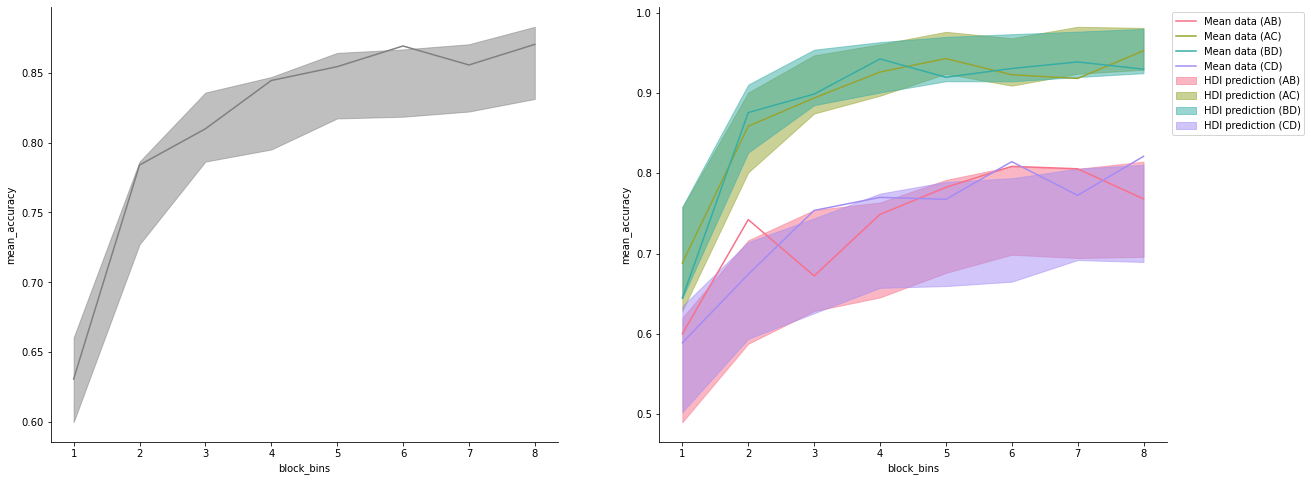
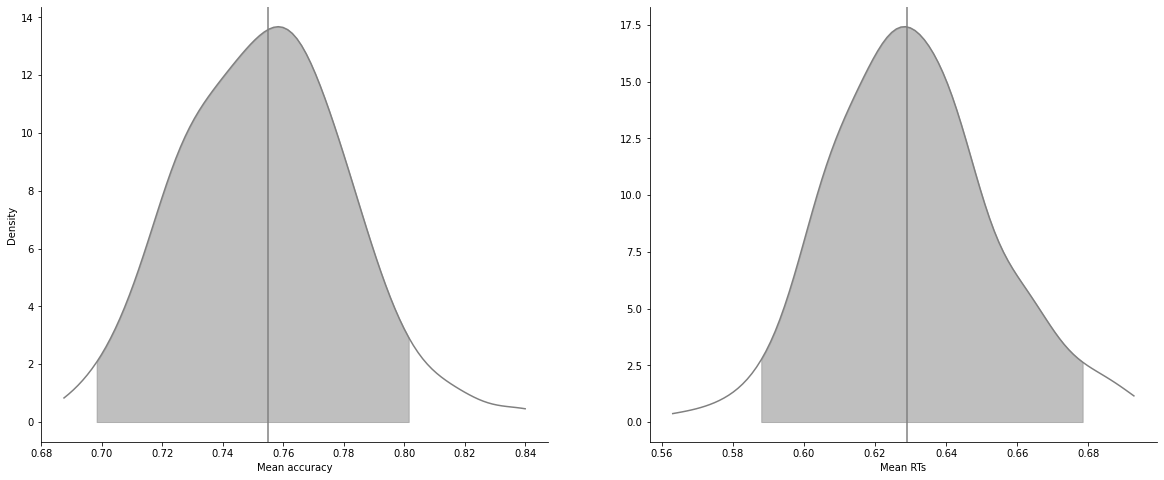
You can plot posterior predictives similarly, both ungrouped (across all trials) or grouped (across conditions, trial blocks, etc.plot_mean_posterior_predictives).
For RT models, you have both mean plots, and quantile plots:
[17]:
model_fit_ddm.plot_mean_posterior_predictives(n_posterior_predictives=200);
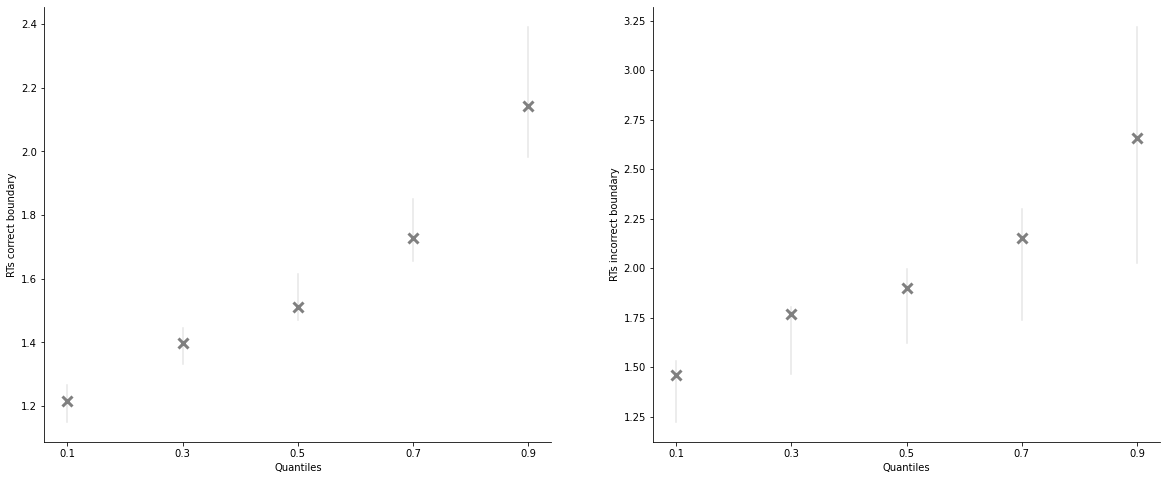
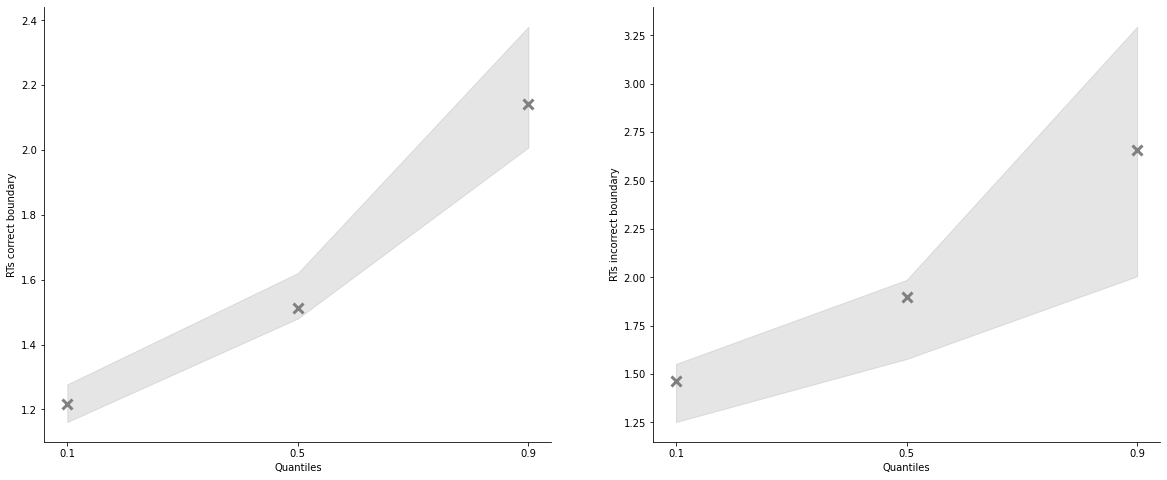
Quantile plots have 2 main visualization options, “shades” and “lines”, and you can specify again which quantiles you want, which in tervals and alpha levels:
[18]:
model_fit_lba.plot_quantiles_posterior_predictives(n_posterior_predictives=200);
[19]:
model_fit_lba.plot_quantiles_posterior_predictives(n_posterior_predictives=200,
                                                   kind='shades',
                                                   quantiles=[.1, .5, .9]);
[20]:
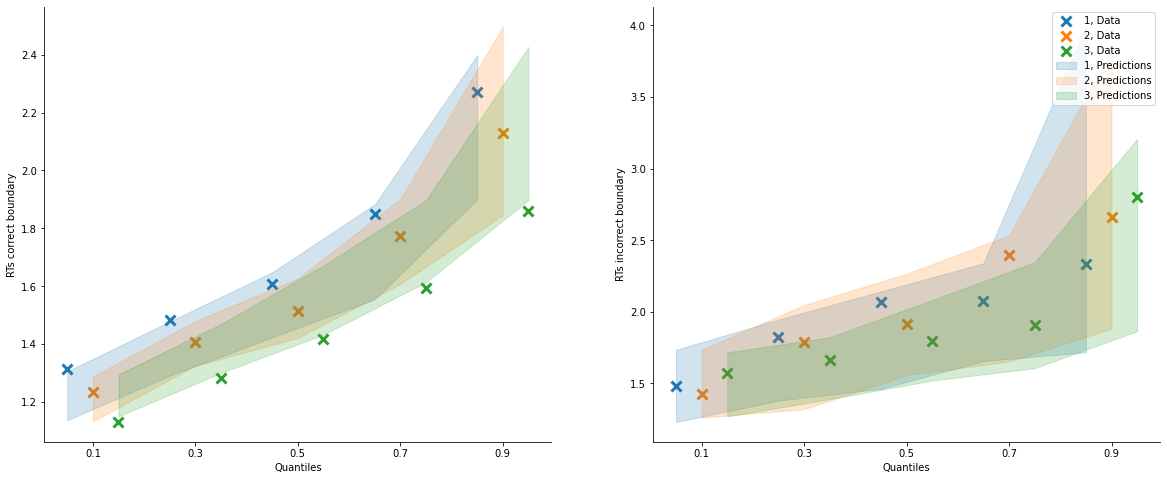
model_fit_lba.plot_quantiles_grouped_posterior_predictives(
    n_posterior_predictives=100,
    grouping_var='block_label',
    kind='shades',
    quantiles=[.1, .3, .5, .7, .9]);
[21]:
# Define new grouping variables:

import pandas as pd
import numpy as np

data = model_fit_rl.data_info['data']

# add a column to the data to group trials across learning blocks
data['block_bins'] = pd.cut(data.trial_block, 8, labels=np.arange(1, 9))

# add a column to define which choice pair is shown in that trial
data['choice_pair'] = 'AB'
data.loc[(data.cor_option == 3) & (data.inc_option == 1), 'choice_pair'] = 'AC'
data.loc[(data.cor_option == 4) & (data.inc_option == 2), 'choice_pair'] = 'BD'
data.loc[(data.cor_option == 4) & (data.inc_option == 3), 'choice_pair'] = 'CD'
[22]:
import matplotlib.pyplot as plt
import seaborn as sns

fig, axes = plt.subplots(1, 2, figsize=(20,8))

model_fit_rl.plot_mean_grouped_posterior_predictives(grouping_vars=['block_bins'], n_posterior_predictives=500, ax=axes[0])

model_fit_rl.plot_mean_grouped_posterior_predictives(grouping_vars=['block_bins', 'choice_pair'],
                                                     n_posterior_predictives=500, ax=axes[1])

sns.despine()